The Google Ads platform works. The math works, the setup is learnable, and if you build a tight Search campaign with phrase match keywords, real conversion tracking, and a budget you can sustain, it does what it's supposed to do.
The problem isn't the platform. The problem is all the upsells built in to get you spending more money.
The day you launch a campaign, you enter a second product nobody warns you about. It's a steady, organized pressure system designed to get you to spend more money, faster, with less control. It shows up three ways: a firehose of emails from Google itself pushing Performance Max, automated bidding, and video ads. Outreach from "Google Ads experts" who are actually third-party contractors. And inside the platform itself, a Recommendations tab with a score that nudges you to hand more control to Google's algorithms.
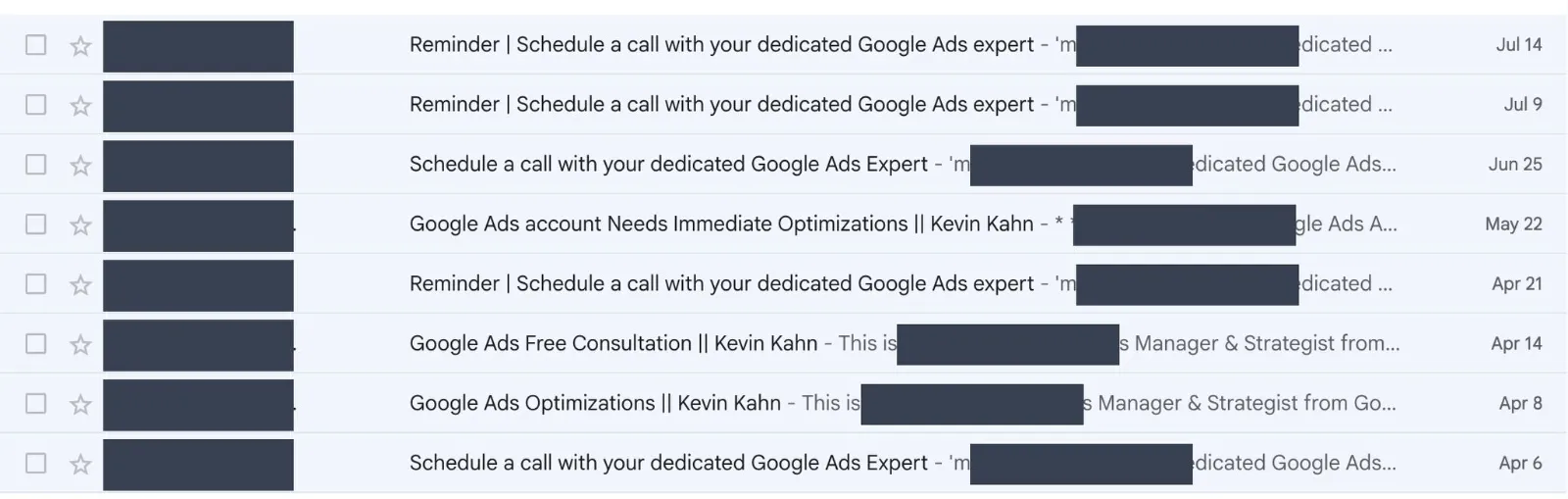
A small business owner with a $500 budget can't tell the difference between useful platform advice and the upsell layer. Most of the bad Google Ads stories you hear didn't start with the platform. They started with someone clicking "Apply All Recommendations" or accepting a rep's suggestion to "test Performance Max."
Here's what that pressure actually looks like, what I found when I went through all of it, and what actually worked instead.
The Email That Said My Campaign Had "Major Issues" (It Didn't)
A few weeks after launching my Google Ads campaign, the rep emails started.
The first one came from Postin Avinash on April 6. Subject: "Schedule a call with your dedicated Google Ads Expert." The body opened with: "I'm Postin Avinash, your dedicated Google Ads Expert. I'm here to provide one-on-one guidance and personalized recommendations." Then this line: "Based on my review of your account, I've already found some immediate solutions that we can implement to help you get to your business goals."
He didn't say what the solutions were. The whole email was structured to get me on a 30-minute call before any specifics were shared. The CTA was a calendar link.
Two weeks later, same rep, escalation. Now Postin claimed he'd been trying to reach me for over a month. My campaign was three weeks old. Then came the email that gave this post its title.
He listed what he called "immediate concerns": "Bidding Strategy Optimization, Conversion Tracking setup issues, and some Major Settings need fixing to avoid further spending." He said the campaigns were "not fully optimized" and that he wanted to help fix this.
Read it the way a small business owner would. "Immediate concerns." "Major Settings." "Need fixing." "To avoid further spending." That's corporate hedge language for your account has major issues and they're costing you money.
I read through all the emails, then logged into Google Ads and checked my account. Conversion tracking was firing correctly on the /thank-you page. Both gtag and PhoneLink were working. My bidding strategy was Maximize Clicks, exactly what I'd set at that stage. My negative keyword list had 27-plus terms. No policy warnings. No eligibility issues.
Then on May 8, a new rep entered the picture. Aryan S, with the most aggressive subject line yet: "Action Required: Improving your Google Ads Rank." His pitch claimed to have diagnosed two specific issues with my account: "your Ad Rank might be low, consequently your ads might not be showing up on top of the page."
Read that quote again. He uses the word "might" twice. He hasn't actually diagnosed anything. The whole "diagnosis" is hedged language wrapped around a sales pitch. The next sentence delivered the offer: "I've found a way to resolve this and improve your visibility by tweaking a few settings, no budget increase required! I only need 10 minutes of your time."
When I checked, my Quality Scores were healthy and my ads were holding top positions for the keywords that mattered. There was no Ad Rank problem.
About a week later, on the same day my $500 credit finally landed, one more rep emailed me. Radhika Raut had a slightly different angle ("I'd like to schedule a meeting to deep dive into these growth opportunities.") with the same basic purpose: to get me to make changes to my account to get more leads.
Four emails, three reps, two months, one script.
The pattern was always the same. An authority claim in the signature line ("Expert," "Senior Supervisor," "Account Strategist"). A concern or growth opportunity stated without specifics. A "complimentary consultation" or "10 minutes of your time" as the CTA. A calendar link at the bottom.
If you get one of these emails, check your account yourself before you book the call. Most of what these emails flag are not necessarily ways to improve your campaigns, they are ways to get you more leads that may or may not be qualified.
The call is the product.
The point isn't that any of these reps are bad people. They're running a script. The point is that a small business owner who doesn't know that will book the call, accept the recommended changes, and never realize their working campaign got broken by the consultation that was supposed to fix it. They might get more leads. The question is whether those leads were ever worth getting.
Your Google Ads Rep Is Not a Google Employee
Most small business owners assume "Google Ads rep" means a Google employee. It doesn't. There's a tell in their signatures and it's usually "on behalf of".
"I'm Radhika, an Account Strategist working on behalf of Google."
That phrase, working on behalf of Google, doesn't appear in emails from actual Google employees. It exists because the people sending these emails aren't employed by Google. They work for a contractor that Google hires to do outbound advertiser support. The disclosure language is required, but it's easy to miss if you aren't looking for it.
Once you know the phrase, you start seeing it everywhere. Postin's emails came with a signature line identifying him as a "Global Onboarding Strategist | KSS, TDCX, on behalf of Google." Aryan's signature was similar. The titles change. The relationship doesn't.
TDCX is the contractor. It's a publicly traded company headquartered in Singapore, operating in the business process outsourcing space. Google contracts them to handle outbound advertiser support, particularly for small and mid-market accounts. They're a legitimate company. This is not a phishing scam. The reps are real people, the consultations are real calls, and the "complimentary" framing is technically accurate because you don't pay them directly.
But their compensation is structurally tied to advertiser activity and spend metrics. The more accounts they activate, the more campaigns that get launched, the more spend they influence upward, the better their performance numbers look. They are not paid to tell you "your campaign is fine, don't change anything." That outcome doesn't show up in their metrics.
A genuinely free service from a publicly traded contractor is a sales motion. Always.
Here's what to look for if you want to identify these emails yourself before booking the call:
These reps are a sales channel meant to increase your spend, which in theory gets you more leads. Treat any advice they give the way you'd treat any sales pitch from any other vendor: potentially useful as a data point, never as a directive. Verify everything against your actual account data before you change anything.
60 Days of Google Ads Emails: What Actually Lands in Your Inbox
Separate from the rep outreach, I got roughly 30 emails from Google Ads directly over my first two months. Different subject lines, different products being pitched, but almost all of them pushed in the same direction: spend more, automate more, broaden more.
The "Click This Button to Automate Your Bidding" Push
This is the category most likely to do real damage to a small budget.
On April 3, Google emailed me a pitch for switching my bidding strategy. Subject line: "Get the best results for your budget with automated bidding." The body:
"Get more conversions at the same budget with the Maximize conversions bidding strategy. Powered by Google AI, this strategy optimizes your bidding in real-time to drive cost-effective conversions and help you reach your goals."
The CTA was a button: "Use Maximize conversions." One click would have switched my campaign's bidding strategy.
My campaign was set to Maximize Clicks. That's a known-cost strategy. I tell Google to spend my daily budget evenly across the day and bid for the most clicks possible. I can predict my daily spend within a few dollars and I know roughly what each click is going to cost me.
Maximize Conversions is different. It tells Google to spend my budget on whichever auctions the algorithm thinks will convert. The algorithm bids more aggressively in auctions it likes, which means individual clicks cost more. The "without increasing your budget" framing in the email is technically true (the daily cap doesn't change) but misleading: you get fewer clicks at higher individual cost, betting that the algorithm's predictions are good enough to make up for it.
For that bet to pay off, the algorithm needs strong historical conversion data to learn from. Google Ads documentation actually recommends having around 30 conversions in the last 30 days before switching to Maximize Conversions. A campaign with five conversions doesn't give the algorithm enough signal. It guesses. And while it's guessing, you're paying more per click for the privilege.
That's the upsell pattern in a single email: a recommendation that sounds like "get more results" but actually means "give Google more control with less data."
The "Your Account Has a Problem" Emails
Subject lines designed to manufacture urgency about something missing or broken.
- "Reminder: Enable your personalized recommendations" (April 17)
- "Add 5 more sitelinks for bigger, more relevant ads" (April 21)
The common move: framing a Google product or setting as a missing step in your account, as if you've failed to do something basic. The word "Reminder" does a lot of work here. It implies you already agreed to something and forgot to follow through. You didn't.
Worth noting: not every email like this is upsell. On March 20, I got one with the subject line "Your account is missing the most important step for Ads success." That one turned out to be a genuine reminder to set up conversion tracking, which is real, useful advice for anyone running ads without it. The challenge isn't dismissing every email. It's learning to tell the useful ones apart from the ones designed to get you to spend more.
The Performance Max Push
Multiple emails over 60 days trying to get me to add a Performance Max campaign.
- "Reach customers across Google with ONE campaign" (April 15)
- "Exclusive offer: Get a $500 USD ad credit and reach more customers with a single campaign" (April 21)
- "Reminder: Get a $500 USD ad credit to try Performance Max" (April 29)
The pitch is always reach and simplicity: one campaign that runs across Search, YouTube, Display, and Gmail. The offer language said Performance Max "amplifies your results."
The reality is that Performance Max needs strong conversion data to work. With one to three conversions, you'd burn $500 on low-intent traffic across YouTube and Display while the algorithm tried to figure out who to target. You'd lose visibility into which specific search queries were driving your leads. And the "exclusive offer" credit comes with a string attached: it only applies to Performance Max spend, which means you have to launch a campaign type that's a poor fit for your business to use it. A "free" credit that requires you to run a specific campaign type isn't really free. It's a structured incentive to get you to try a product you wouldn't otherwise try.
The Product Expansion Push
I also got emails pushing Veo for video ads, Shopping campaigns, and other products designed for retail and e-commerce. I'm a web designer. I don't sell physical products. I'm not running YouTube video campaigns on a $16/day budget. These emails get sent regardless of fit, because Google's email system targets by account type, not by what would actually make sense for your business.
There is no email titled "Your campaign is tight and well-targeted. Keep doing what you're doing." That email doesn't exist because it doesn't grow Google's revenue. Every email Google sends about your campaign has a product or a setting change at the end of it. Following those recommendations as a default will, over time, move your account in one specific direction: more reach, less control, higher costs.
"Apply All Recommendations" Is the Most Expensive Button in the Interface
The email pressure stops when you close your inbox. The pressure inside Google Ads doesn't.
Open your campaign dashboard and look at the top of the screen. You'll see a number, usually somewhere between 70% and 85%, labeled your optimization score. Next to it is a tab called Recommendations. Click it and you'll get a list of suggested changes to your account, each with an Apply button. At the top is an Apply All button that takes care of every suggestion at once.
The setup looks helpful. The score makes it look like a grade. It's not what it looks like.
The optimization score is not a measure of how well your campaign is performing. It's a measure of how closely your account matches Google's default settings. Those are different things. A campaign with a 70% optimization score can be generating real qualified leads at a defensible cost per acquisition. A campaign with a 95% optimization score can be burning budget on broad match queries that have nothing to do with your business.
Walk through what a typical small business owner sees on that tab:
Every one of those recommendations either expands Google's ability to spend your money or reduces your control over where it's spent. None of them sharpen what you already have. The Apply All button is a one-click commitment to making your account look more like Google's default and less like a tightly targeted campaign. Google will even offer to apply recommendations automatically on a rolling basis. Don't enable that.
To make this concrete: I tested broad match on one keyword during my second month, just to see what would happen. Forty-six percent of the spend on that single keyword went to search queries that had nothing to do with the service I was advertising. One keyword. One match type change. Nearly half the budget wasted. That's not a hypothetical. That's what showed up in my search terms report during a test week before I tightened it back.
Now picture clicking Apply All Recommendations on a list that includes broadening match types on every keyword in your account. The damage scales with the number of changes.
A low optimization score is not a problem. A high one might be. The score is Google's KPI, not yours.
A disciplined campaign with a 70% optimization score, weekly negative keyword work, and conversion tracking that actually fires is worth more than a 95% campaign on autopilot.
What a Tight Google Ads Campaign Actually Looks Like at $500 a Month
Enough about what to avoid. Here's what I actually ran.
I covered the full setup in detail in the companion post, How to Set Up Google Ads for Your Small Business. Here's the short version of what that actually looked like over two months.
Search campaign only. No Performance Max, no Display, no YouTube. One campaign type, one place where my ads showed up: above the organic results on Google search.
Thirteen phrase match keywords, geo-targeted to Delaware across New Castle, Kent, and Sussex counties. Not exact match, not broad match. Phrase match gives me enough flexibility to catch real variations of how people search, without opening the door to tangential queries that broad match would let in.
Update, October 2026: in a market the size of Delaware, most of those phrase keywords turned out to get very few searches. Today almost all of my leads come from one broad match keyword backed by a negative keyword list of more than 300 terms that I add to every week. The point of this post still holds: don't take Google's advice to broaden everything. Add broad match on purpose, one keyword at a time, once your tracking works and you're reading the search terms weekly.
One conversion goal. Form submissions firing on the /thank-you page via gtag. Not phone calls, not page views, not "engaged sessions." One signal I trusted, tracked cleanly.
Maximize Clicks bidding, not automated bidding. I wanted to see what happened at known cost levels before handing the wheel to an algorithm. Maximize Clicks is predictable. That predictability is what makes the data legible.
Aggressive negative keyword list, built and expanded weekly from the search terms report. The list started small and is now past 30 terms. This is the single most valuable ongoing activity in the account.
Sixteen dollars a day. Sustainable for the full month. Designed to generate usable data, not to scale.
Two months in, the campaign produced real leads, including one project worth roughly $2,700 currently in the pipeline. Cost per click stayed in a defensible range. The conversion rate on the keywords that mattered most ("need a website for my business" was the standout) was real and trackable. I could point at specific queries and say that one is working.
The discipline here isn't about doing the perfect thing. It's about not doing the things that would dilute the data. Broad match dilutes the data. Performance Max at low conversion volume dilutes the data. Automated bidding without conversion history dilutes the data. Every Google email and rep recommendation I got, if I'd followed it, would have made the account look more "optimized" on Google's scoreboard and made the data harder to read on mine.
A tight Search campaign with phrase match keywords, accurate conversion tracking, and weekly negative keyword work will outperform a "fully optimized" account with automation layered on, especially at a small budget.
This is not a theory. I watched it play out across two months in my own account.
The $500 Credit Finally Landed. The Discipline Worked.
On May 13, 2026, the $500 match credit posted to my account. It expires June 11. Google offers this credit to new advertisers when they spend their first $500. I hit that threshold in late April. The credit took about three weeks to clear processing, but it landed.
The arithmetic: roughly $900 in real budget spent, $500 back in credit, and a $2,700 project in the pipeline.
More importantly, I never accepted a single recommendation from Google or a rep that would have changed the campaign structure. No Performance Max. No automated bidding. No broad match expansion. No "Apply All Recommendations." No 10-minute calls with anyone working on behalf of Google.
If I'd taken Postin's complimentary consultation in April and accepted his recommended changes, the most likely outcome would have been a Performance Max campaign running on the second $500 credit offer, automated bidding switched on before the account had enough conversion data to make it work, and a search terms report that no longer told me anything useful. The campaign would have looked more "optimized" on Google's scoreboard. The leads would have been harder to attribute. And the story would end the way most small business Google Ads stories end: "I tried it, spent the money, didn't see the results."
I've heard that story from a lot of small business owners. Most of the time, it's not the platform that failed them. It's the advice that came with the platform.
The credit is real. The platform works. The discipline is what makes both of those true.
How to Tell Useful Platform Advice from the Upsell Layer
Not every email from Google is upsell. Not every rep recommendation is a trap. The hard part is telling them apart in real time.
One question works as a filter for almost everything you'll get from Google.
Does this expand what Google can charge me for, or does it sharpen what I already have?
Run every email, every rep suggestion, and every in-account recommendation through it before clicking anything. Here's how it shakes out across the most common pieces of advice:
The pattern is consistent. Real optimization means less spend on irrelevant traffic, not more reach. Anything that increases reach without tightening targeting is upsell, not optimization.
You don't need to fight Google to run a successful campaign. You just need to know that the platform and the upsell layer are two different products, and to evaluate every piece of advice on which one it's coming from.
If You're Already Running Google Ads, Here's How I Can Help
Most of what I covered in this post is learnable. You can do it yourself if you have the time to read your search terms report weekly, build the negative keyword list, ignore the email firehose, and resist the in-account pressure. It's not technically complicated. It's discipline, and it's time.
For a lot of small business owners, the time isn't there. Running a service business is already a full-time job. Sitting with Google Ads for an hour every Sunday is a real cost, especially when the platform is actively pushing you toward decisions that will cost you more money.
There are two ways I help with this.
Starting clean. If you haven't run Google Ads yet, or if you want to start over with a tight Search campaign built the way I built mine, I can set that up for you. Account setup, keyword research specific to your business, ad copy in your voice, conversion tracking installed and verified on your site, negative keyword list built from your first weeks of data, and a clear 30-day test framework so you actually know whether it's working.
Auditing what you already have. If you're running Google Ads and not sure whether it's working, I can go through your account, tell you what's tight and what's leaking, and give you a specific list of changes to make. If you want me to make the changes for you, I can do that too. This is a shorter and less expensive engagement than a full setup.
A few things worth knowing upfront:
If that sounds useful, reach out and tell me where your account stands.