Google Ads has a bad reputation among small business owners. Most of them earned it the hard way: they ran a campaign, spent a few hundred dollars, got no leads, and concluded the platform doesn't work. In almost every case, the platform didn't get a chance to work optimally. During the setup, almost everything is geared towards sending your business more leads, but it should be optimized to get your more qualified leads.
In March I built a Google Ads campaign from scratch for my own business, Kevin Kahn Web Development. My site was already in good shape, working contact form, a dedicated thank-you page at its own URL, Umami analytics already tracking visitor behavior. I built a Search campaign with phrase match keywords targeting Delaware, wrote the ad copy myself, installed a gtag conversion snippet on the thank-you page, added a UTM tracking template, and set a $16 daily budget as a controlled test.
The initial build took about four to five hours, and my site was already in decent shape going in. But that's not the whole picture. I spent another couple of hours over the first week checking that conversion tracking was firing correctly, verifying ad formats, and making small tweaks based on early data. If you're starting from scratch, budget even more. This isn't a set-it-and-forget-it thing, at least not in week one.
Why Most Small Business Google Ads Fail Before the First Click
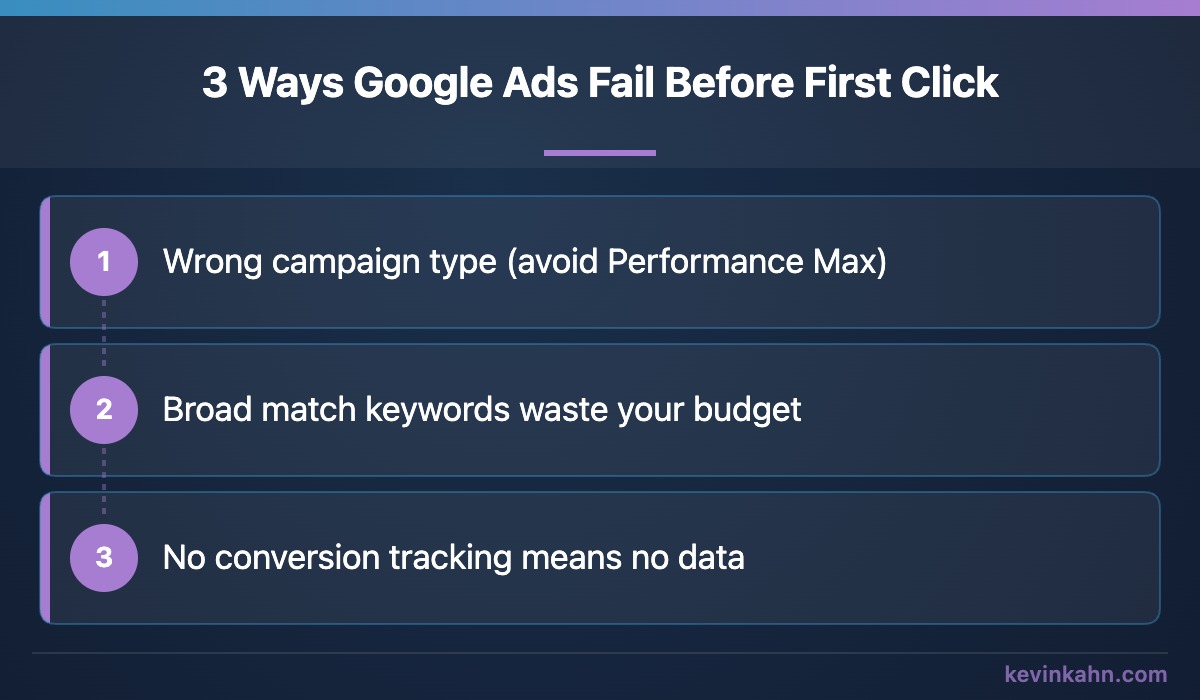
Three mistakes kill most small business campaigns before a single qualified lead comes through. They're not obscure. They're the default path if you don't know what to watch for.
Most people who "tried Google Ads" ran into all three of these at once. That's not bad luck. That's the default setup.
Before You Touch Google Ads, Your Site Has to Be Ready to Convert
Paying for traffic before your site is ready to handle it is the original leaky bucket problem. Google Ads can send qualified people to your door. If your door is broken, you just paid for nothing.
Here's what has to be in place before you spend a dollar.
First, a clear contact form that actually works. Test it yourself. Submit it and make sure the notification arrives. This sounds obvious. You'd be surprised how often it isn't.
Second, a dedicated thank-you page at its own URL. Not a pop-up. Not a form that resets. A separate page, something like /thank-you, that only appears after a successful form submission. This is what your conversion tracking will fire on. Without a unique URL, you can't reliably tell Google that a conversion happened.
Third, analytics already installed and running. You need baseline data on how your site behaves before you add paid traffic. If you're starting from zero, a lightweight tool like Umami is easy to install and doesn't complicate things with privacy concerns or heavy scripts.
If your site isn't ready to capture and track a lead, you're not ready for Google Ads. Fix the foundation first. It takes a day. It saves you weeks of wasted spend.
The build itself is the easy part. Getting the prerequisites right is where most people skip steps.
How to Build Your Search Campaign: The Decisions That Actually Matter
When I set up my own campaign, the mechanics were straightforward. The judgment calls were not.
Choose Search, not Performance Max. Google will push you toward Performance Max at every step. Ignore it. For a local service business with a limited budget, you need to know exactly where your ads are showing and which keywords are driving clicks. Performance Max buries that information. Search gives you full visibility.
Start with phrase match keywords. I built my first keyword list around phrases like "web design company in Delaware" and "small business web designer Wilmington." Phrase match means your ad shows when someone's search contains that phrase or a close variation, but not for every loosely related query. It's tighter than broad match and more flexible than exact match, and it makes the search terms report easy to learn from in your first month.
Here's what I didn't expect. In a market the size of Delaware, most of those phrases barely get searched. One of my phrase keywords, "website designer," showed my ad 11 times in a month. Today almost all of my leads come from a single broad match keyword, "need a website for my business," backed by a negative keyword list of more than 300 terms that I add to every week. Broad match found searches I wouldn't have thought to bid on, like "marketing company near me," which turned into one of my best projects. The negative list keeps out the rest: other agencies' names, DIY website builders, hosting, templates, and people looking for jobs or tutorials.
So my advice now: start with phrase match while you learn what people in your area actually search. If the volume isn't there after a month or two, try one broad keyword, but only once your conversion tracking works and you're reading the search terms every week. Keep the keyword list short. Five to ten well-chosen keywords beats thirty unfocused ones. You want enough data to learn from, not so many keywords that your budget gets scattered across too many signals to interpret.
My headlines focused on what a small business owner in Delaware actually wants: someone local, someone who won't disappear after launch, and a price that isn't a mystery. Answer those questions in your copy before you worry about keyword density.
Set a budget you can sustain for 30 days. I chose $16 a day. That's around $500 for the month. It's enough to generate real data. It's not so much that a bad two weeks destroys you.
I used Claude as a sounding board throughout this build. Not to generate the campaign for me. To explain the reasoning behind decisions like phrase match vs. broad match so I understood what I was setting up, not just what to click. The research, the keyword choices, the ad copy, those were all mine.
Installing Conversion Tracking So You Know What's Actually Working
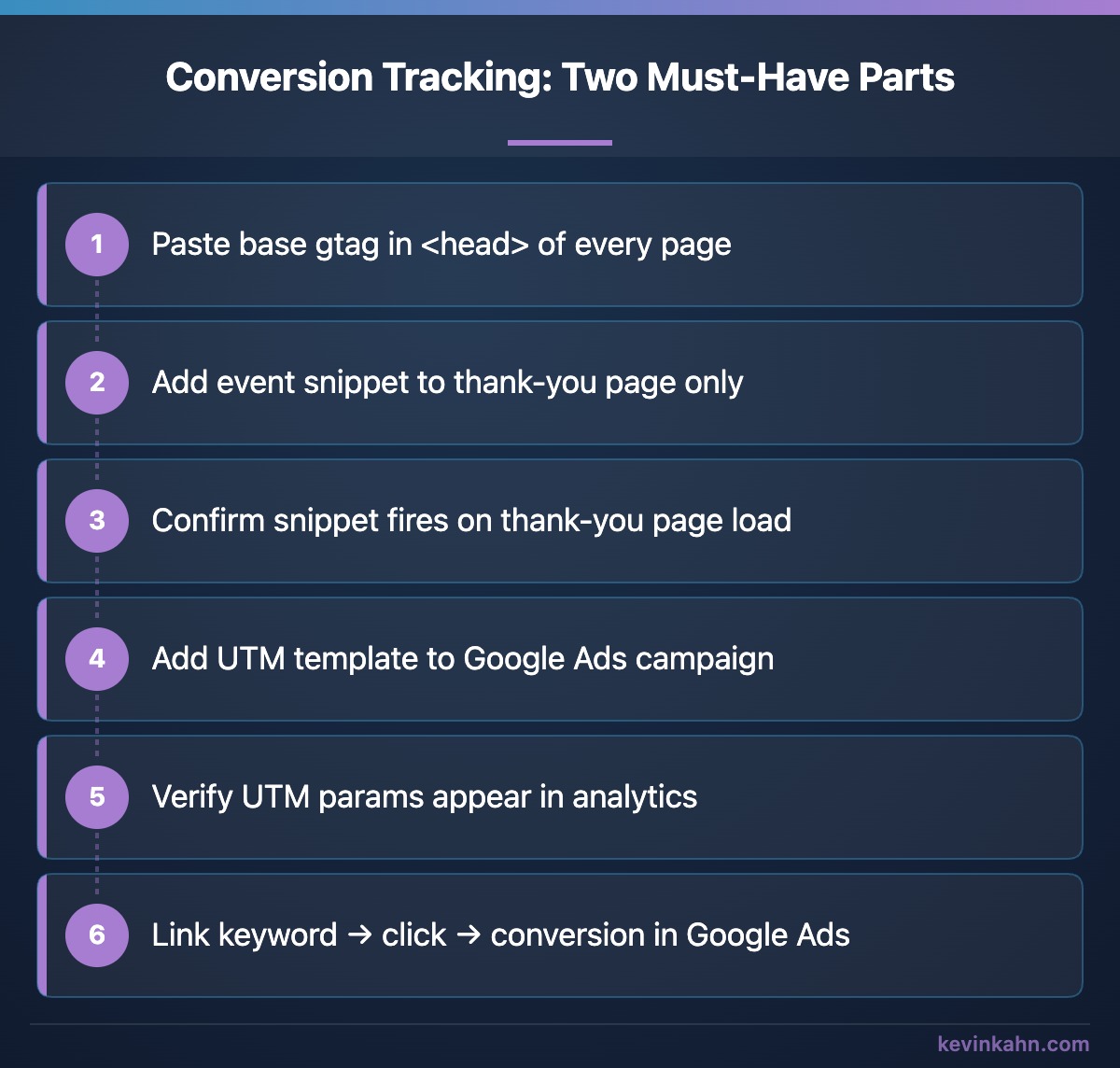
Conversion tracking has two parts. You need both.
The first is a gtag conversion snippet on your thank-you page. When someone lands on that page after submitting your contact form, the snippet fires and tells Google a conversion happened. Google then connects that event back to the keyword and ad that drove the click. Without this, Google is flying blind when it optimizes your campaign. So are you.
Installing it looks more complicated than it is. You paste your base gtag snippet into the <head> of every page on your site. Then you paste a separate event snippet specifically onto your thank-you page. If your site runs on WordPress or a similar CMS, this is usually a few minutes of work. If you're managing the HTML directly, it's even simpler.
The second part is a UTM tracking template. This is a URL parameter that gets appended to every click from your Google Ads campaign. It looks something like ?utm_source=google&utm_medium=cpc&utm_campaign=wilmington-web-design. When that parameter shows up in your analytics, you know the visit came from paid search, not organic. Without it, a click from Google Ads and a click from Google Search look identical in your analytics dashboard.
Together, these two tools answer the questions that matter: Did the click turn into a lead? Was it worth the cost?
Pick One Conversion Goal and Commit to It
Here's something I didn't fully appreciate going in. Tracking too many things at once, especially in the first 30 days, makes your data harder to read, not easier.
Form submissions and phone calls are both valid conversion goals. But they behave differently, they cost different amounts to track reliably, and mixing them in a single campaign with a small budget means you'll never accumulate enough signal on either one to make confident decisions.
Pick the one that matters most to your business and track that. For me, it was form submissions. My thank-you page fires the conversion event. Every lead that comes through the contact form gets counted. Clean, simple, unambiguous.
At $16 a day, you might see two to four conversions in a month. That's enough to learn from if you're tracking one thing well. It's not enough if you're splitting it across form submissions and phone calls and two other signals at the same time.
Phone call tracking requires an additional layer of setup. Dynamic number insertion, a call tracking service, forwarding rules. It's not hard, but it adds complexity. Save it for month two, after you've proven the basic campaign works.
How to Run a Clean 30-Day Test Without Burning Your Budget
The first month is for learning, not optimizing. The distinction matters.
Watch your search terms report weekly. This shows you the actual queries that triggered your ads, not just the keywords you bid on. You'll find searches in there that have nothing to do with your business. Add those as negative keywords immediately. This is the most useful thing you can do in the first 30 days.
Ignore click-through rate for now. A high CTR means your ad is getting clicks. It doesn't mean it's getting the right clicks. Wait until you have conversion data before you judge an ad's performance.
Don't change your bids or budget mid-month unless something is obviously broken, like your budget draining by noon every day with zero conversions. Small adjustments before you have enough data create noise, not signal.
At the end of 30 days, look at cost per conversion. If you spent $500 and got three qualified leads, you paid about $165 per lead. Whether that's worth it depends entirely on what a new client is worth to you, not some industry average.
Before drawing any conclusions you need at least 30 days of data, a handful of conversions, and a clear sense of which keywords drove them. Without those three things, you're not optimizing. You're guessing.
After the First Month: Check Google's Numbers Against Your Inbox
I have been running this campaign since March. The habit that has helped me most since then isn't in the Google Ads dashboard. Once a week, I compare what Google says came in with what actually reached my inbox and my phone.
They don't always match. In late August, my dashboard showed zero conversions for the week. I had actually gotten two phone calls from my ads. Google was only counting calls that lasted longer than a minute, and nobody who dialed the number on my website was being tracked at all, because I had only set up tracking for the call button inside the ad.
Earlier that summer it was form leads. They kept arriving in my inbox, but for about four weeks Google wasn't recording them. I cut my budget based on what the dashboard showed, and the dashboard was wrong.
Then, after I set up tracking for calls from my website, it recorded nothing for a week. My own site's security settings were blocking Google's call tracking script.
None of these showed up as an error in Google Ads. I caught them because the numbers didn't match what I was seeing in real life.
Here's the weekly check. It takes about ten minutes:
- Count the real leads you got that week: forms, calls, emails, texts.
- Look at the conversions Google recorded for the same days.
- If they don't match, look at the tracking before you change the budget, bids or keywords.
If you take calls, two settings are worth a look:
Earlier I suggested saving phone tracking for month two. I'd still start with one goal, but don't put calls off for long. Some of the best leads this campaign has brought me came in by phone.
You Can Do This Yourself. Here's What to Do If You Don't Want To.
The mechanics of setting up a Google Ads campaign are learnable by anyone. The part that takes real time is understanding why each decision matters, and what goes wrong if you skip it.
When I built my campaign, I used Claude as a knowledgeable guide throughout the process. Not to do the work for me. The research, the keyword choices, the ad copy, the judgment calls, those were all mine. But having a resource that could explain the reasoning behind phrase match versus broad match, or walk through exactly how a gtag snippet fires on a thank-you page, changed the quality of the build. I made fewer assumptions. I understood what I was setting up and why.
That's my takeaway. If you're willing to spend four to five hours on research and careful setup, you can do this yourself. The build I described in this post is repeatable. It's not magic.
If you'd rather hand this off to someone who's already made the mistakes and knows what a clean setup looks like, this is something I can help with. My Google Ads management page has the plans and pricing. If you're not sure which fits, just reach out and we can go from there.